Your Racing Master gems only credit if this install is actually SEA. Run the check first, then migrate, then pay — no in-game toggle exists.
The yes-or-no SEA check
You are sitting on a SEA gems checkout. Pause there.
Racing Master is a realistic mobile and cross-platform racing game from NetEase and Codemasters. Gems are the paid premium currency. They buy special items. They do not hop between regional databases. A SEA SKU pointed at a Western Player ID does not “find” you later. Do not pay until you can answer this out loud: is this install the SEA client?
On Android, read the package name. The Europe, North America, and Middle East Google Play build is com.netease.dfjsna. That string means close the checkout — you are not on SEA. iOS hides the bundle, so go by the store listing title, the boot branding, and the account you actually logged.
The SEA client wears SEAExptional Global branding. You should see region-specific campaigns: Weekly Passes, the 95 free draws, and a direct hypercar exchange pitch the Western notes do not use. If the splash and the store page still talk like a NA/EU/ME launch, you have the wrong binary.
Gold and Diamonds will not save you. Those exist on every region. Gems are the pile you are about to buy with real money. Mix those labels and you will stare at a full garage currency bar that still cannot accept a SEA top-up.
Racing Master splits its money into three piles. Keep this table next to the checkout so the SKU matches the currency you actually need.
| Label | Value | Note |
|---|---|---|
| Gold | Free In-Game Currency | Used for vehicle performance part upgrades and cosmetic purchases; earned via Career Mode and stores. |
| Diamonds | Earnable Premium Currency | Used for Peak Car Exhibition vehicle draws and Club creation (200 Diamonds); earned via Rank progression. |
| Gems | Paid Premium Currency | Obtained strictly through real-money top-ups and CBT rebates; used to purchase special items. |
Takeaway: only Gems are a real-money SKU, and only a SEA client will accept a SEA Gem order against your Player ID.
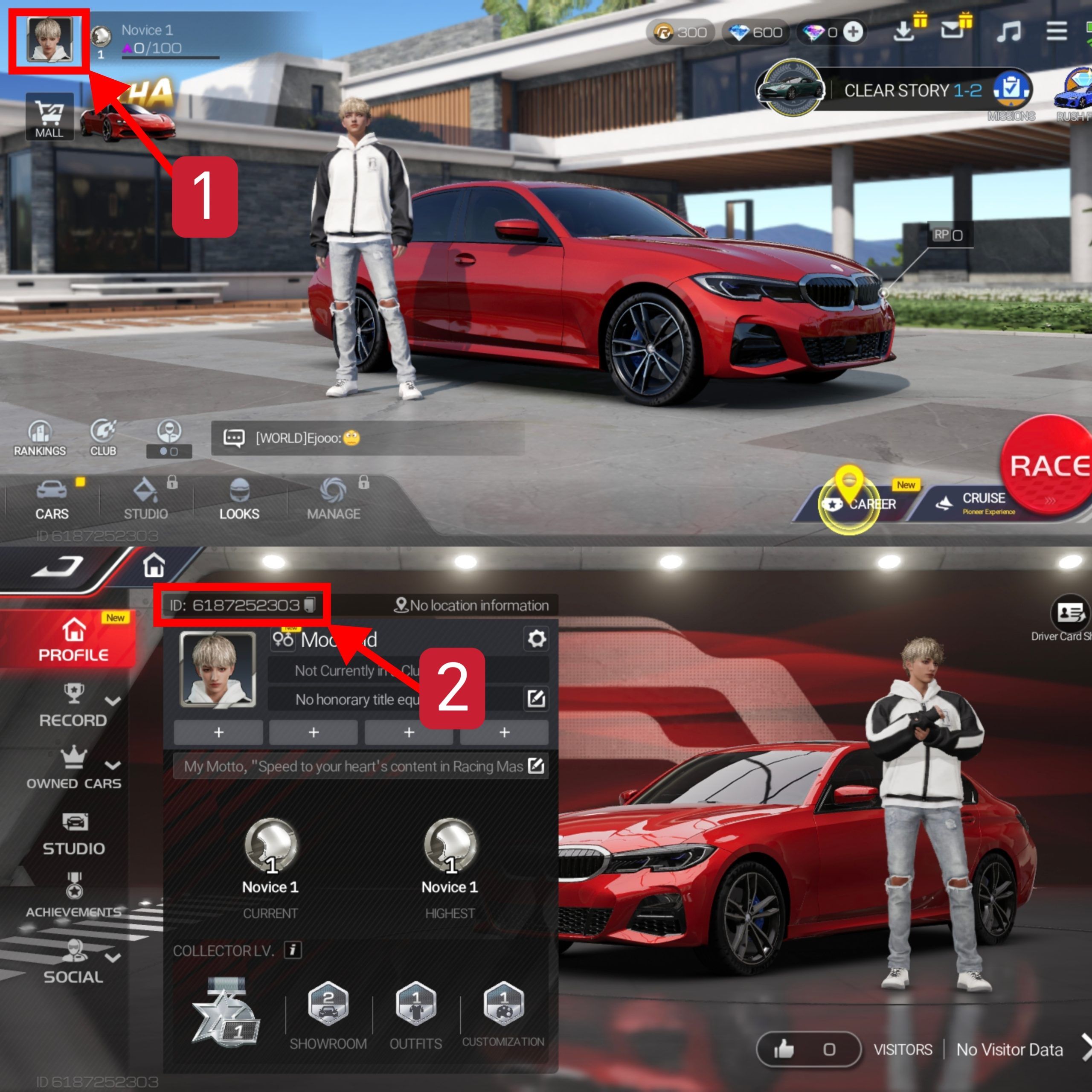
Find that ID before you type a single digit into a form. Open your profile. Open Add Friend. Copy the numerical Player ID exactly — no spaces, no extra digit. Display names collide. IDs do not.
If the package is com.netease.dfjsna, or the listing is the Western one, the answer is no. Do not order SEA gems against that ID until the client itself is SEA. Wrong region is not a slow delivery. It is a different ledger.

Racing Master (SEA)
4.35 · 743 sold
- -40%
70 +4 Gems
Buy NowUSD 0.89
USD 1.25
- -40%
350 +18 Gems
Buy NowUSD 4.56
USD 6.39
- -40%
700 +35 Gems
Buy NowUSD 9.14
USD 12.79
- -40%
1000 +50 Gems
Buy NowUSD 12.95
USD 18.13
- -40%
1400 +70 Gems
Buy NowUSD 18.07
USD 25.30
- -40%
2100 +105 Gems
Buy NowUSD 27.30
USD 38.21
- -40%
3400 +170 Gems
Buy NowUSD 44.00
USD 61.60
- -40%
6600 +330 Gems
Buy NowUSD 85.20
USD 119.29
- -40%
PREMIUM MP
Buy NowUSD 8.69
USD 12.16
- -40%
Weekly Card
Buy NowUSD 0.90
USD 1.27
- -40%
Monthly Card
Buy NowUSD 2.10
USD 2.94
- -40%
DELUXE MP
Buy NowUSD 4.67
USD 6.54
- -40%
Growth Fund
Buy NowUSD 5.94
USD 8.32
- -40%
Upgrade to the Premium MP
Buy NowUSD 4.06
USD 5.68
- -40%
Value Outfit Pack
Buy NowUSD 0.90
USD 1.27
Stop looking for a region button
Settings. Server. A dropdown. Four taps. That menu is not in Racing Master.
Regions are bound to the store listing and the client build. They are not a graphics option. The Western package ID exists because that install talks to a different account database. SEA is another build, another ledger, another set of launch campaigns. NetEase did not park a region switch next to gyro and shadow quality. Other racers train you to expect a server list. This one does not work that way.
Open Settings > Essential and you will find Support and Bug Report. Use that path for account, transaction, or technical tickets on the region you already live on. Do not file a ticket asking them to slide you from Global to SEA. You would be asking two products to merge. That is not what Bug Report is for.
Closed beta spending is locked the same way. Players who paid during CBT get a 150% Gem rebate on launch — 150% of what they spent, credited as Gems on that same regional account. That rebate does not follow you to SEA. Beta progress does not transfer across unlinked regional clients.
Stay in this garage, flip a switch, keep the cars: will not happen. Official SEA install. New SEA account. New Player ID. Then a SEA Gem buy. Not before.
SEA versus the Western client
“Global” is not one puddle.
The Western Google Play release is the com.netease.dfjsna build. SEA is a separate client with its own passes and its own draw calendar. Launch windows even look different: new regional rollouts have thrown up to 300 launch pulls and at least 3 gold-tier cars, including Ferrari F8 Tributo '20, across 7 days. That gift sits on the server that launched it. It does not travel with you to another region.
Use this side-by-side when you are still unsure which icon you are holding.
| Signal | SEA client | Western (EU / NA / ME) client |
|---|---|---|
| Package ID | Not the Western string | com.netease.dfjsna |
| Store branding | SEAExptional Global, Weekly Passes, 95 free draws | Regional Western listing, no SEA campaign set |
| Gem ledger | SEA account + SEA Player ID | Separate Western ledger |
| CBT 150% Gem rebate | Only if you spent on that SEA beta | Stays on the Western account that paid |
| Can a SEA Gem SKU credit it? | Yes, once the ID is SEA | No |
Takeaway: if any row on the left fails, you are not ready to pay. The right-hand column is how Gems disappear into a database you cannot see.
Storage is the boring gate. Both iOS and Android want more than 10GB free to install and unpack. If you are deleting the Western client to make room, do it on purpose. You are not “updating.” You are leaving that account behind.
Official beta notes asked for Android 7.0 and a Snapdragon 820 or better. Other listings claim Android 5.0. Trust the stricter official floor — Android 7.0 and Snapdragon 820. A half-installed 10GB client on an old SoC is how people lose an afternoon and then tap gems into the wrong leftover icon.
Moving the account onto SEA for real
Nothing in the old garage walks over. This is a reinstall plus a new registration.
Write down the old Player ID so you do not confuse it later. You will not be topping that one up for SEA. Confirm you have more than 10GB free. Remove the non-SEA client. On Android, make sure com.netease.dfjsna is actually gone, not sitting there disabled. Install the official SEA client from the storefront that lists the SEA / SEAExptional release. Skip random APK mirrors. Wrong package, wrong server, same hole.
Create a new account on that SEA client. Log in. Open profile. Copy the new numerical Player ID. Check branding one more time: Weekly Pass, the 95-draw talk, no dfjsna package. That new ID is the only number a SEA Gem order should ever see.
Your old garage stays put. Gold. Diamonds. The Club you spent 200 Diamonds to found. The car that hit 1200 ranking points and entered the Vehicle Hall of Fame, where only five later races still count. None of that walks over. Dual-wielding two regions is fine. Pretending they are one account is how gems vanish. Only do this if you actually intend to play SEA.
Once that SEA ID is sitting in your notes, the SEA gem packs listed for Racing Master are the SKU that can credit it. Match the region on the product page to the client you just installed. If the page says SEA and the package still says dfjsna, you failed the check. Start over. Do not “try the order anyway.”
F2P, mid, and heavy: three different calls
The reinstall costs 10GB and a new Player ID. What you do next depends on whether Gems are even on the table.
F2P. Do not migrate for a storefront. If you are not buying Gems, stay on the client you already race. Gold from Career and Diamonds from rank still upgrade parts and feed Peak Car Exhibition. Founding a Club is 200 Diamonds, not Gems. A Hall of Fame run is 1200 ranking points, not a top-up. Save the reinstall for when you actually want SEA events.
Mid. If you already decided SEA is home — Weekly Pass, those 95 draws, the hypercar exchange — then migrate first, buy second. Move, race one session, screenshot the Player ID, and only then open a small Gem pack. Do not dump a week of coffee money onto an ID you have not seen in the SEA profile with your own eyes.
Heavy. Confirm the package is not com.netease.dfjsna. Confirm the ID is the SEA one. Confirm the product page is the SEA listing. Then buy Racing Master Gems for the SEA client against that ID and nothing else. If you spent on a different region's CBT, keep that 150% rebate where it landed. It will not stack onto SEA.
Live pack sizes and prices sit on the product page.
What a legitimate top-up asks for
The form is short on purpose. It asks for the game, the SEA region, and your numerical Player ID. It shows the Gem amount before you pay. It does not ask for your account password. It does not ask you to share an SMS code, a binder PIN, or a screenshot of your whole settings tree. It does not DM you a “recovery” file.
A scam asks for the password. Or it wants you to install a “region unlocker.” Or it wants the old Western ID because “the system will convert it.” It will not. Anyone selling a toggle that does not exist is hunting you.
If something already went wrong on an official purchase, use Settings > Essential > Support > Bug Report on the client that took the money. Do not hand that ticket thread to a stranger in chat.
nxpgame is the storefront this page points at. Check the live checkout on the SEA product page for whatever payment options your country currently shows. Those options change by country and week; a printed list goes stale.
FAQ
How do I verify if my Racing Master installation is the SEA client before buying gems?
Check the package name and the store listing. If Android shows com.netease.dfjsna, that is the Western build, not SEA. Purchasing SEA gems for a non-SEA account is how top-ups fail to land. Match SEAExptional branding and a SEA Player ID before you pay.
Can I change my server region within the Racing Master app settings?
No. Server regions ride on specific client builds and account databases. There is no in-app toggle. To play SEA you install the official SEA client and register there. Settings > Essential is for support tickets, not a server picker.
Where can I locate my Racing Master Player ID for top-ups?
Your Player ID sits in the profile interface and under the Add Friend menu. Copy the exact numerical ID. That is the only identifier a third-party Gem order should use. A display name is not enough, and a Western ID will not convert.
Do beta progress and gems transfer between different regional client versions?
No. Beta progress and regional account data stay on the server that created them. The 150% CBT Gem rebate credits only the regional account that spent the money. Unlinked clients do not merge, and support will not slide the rebate for you.
What happens if I buy SEA gems on the Western package by mistake?
The SKU and the ledger will not match. Those Gems should not appear on the Western client. Confirm the client first. If you already paid the official store on the wrong region, file through Settings > Essential > Support > Bug Report on that same client.
How much storage do I need to install the SEA client from scratch?
More than 10GB free on iOS or Android, because the client still has to unpack assets after the download. Clear that space before you delete the old region or you will sit in a half-finished install with no garage and no ID.
Pay only after the ID matches
Here is the sequence.
If the package is com.netease.dfjsna, you are not on SEA. Uninstall. Take the official SEA client. Make a new account. Copy the new Player ID. If the branding is already SEAExptional and the ID is already SEA, you are done checking. Buy against that number.
Do not hunt a hidden region switch. Do not reuse a Western ID “just to see.” Do not keep the old garage and hope Gems notice you. Region is the build. Gems are the paid currency. The checkout only works when those two agree.
Until they do, close the tab. After they do, the SEA product page is the order. Not before.