Redeemed a China iTunes card but see zero balance? Learn how to refresh your App Store cache, fix regional ID mismatches, and trace missing credits fast.
You scratch off the pin, enter the 16-digit voucher code into the App Store, confirm the prompt, and wait for your balance to update. Instead, the screen flickers, shows zero, or throws an error claiming the voucher is already spent. Your account balance remains stuck at ¥0.
This is a common issue with regional Apple IDs. In most situations, the funds are completely safe on Apple's servers.
Industry tracking indicates that 18–22% of gift card customer inquiries involve redemption confusion. Over 35% of those stem from cross-regional account mismatches, while over 60% trace back to device-side caching glitches or manual input mistakes. A Mainland China Apple Gift Card is a digital voucher denominated in Chinese Yuan (CNY / ¥) used to fund a Mainland China Apple ID balance for apps, in-game purchases, and subscriptions on the China App Store. Because Apple operates strict regional walled gardens, resolving a stalled balance requires systematic troubleshooting.
Follow this diagnostic guide to trace your funds, clear stubborn iOS display caches, and restore your App Store credit balance.
Why Your China App Store Balance Is Stuck at Zero
When a code successfully registers on Apple's servers, your local client must pull the new balance payload. If the handshake drops or the client relies on cached account states, your screen displays outdated numbers.
Four primary root causes explain a zero-balance display after entering a code:
- Local App Store Cache Freeze: The transaction completed on the server, but your local App Store app has not pulled updated metadata.
- Split Account Logins: You redeemed the voucher on an Apple ID assigned to Media & Purchases that differs from your primary iCloud profile.
- Silent Debt Settlement: The redeemed CNY was instantly deducted to pay off a pending subscription renewal or unpaid app purchase.
- Handshake Interruption: A VPN switch or connection glitch caused the client to display an error even though the backend claimed the code.
The breakdown below contrasts cosmetic display stalls with genuine redemption errors:
| Problem Indicator | Primary Root Cause | Direct Diagnostic Step |
|---|---|---|
| Code accepted, balance displays ¥0 | Stale local App Store cache | Sign out and back into Media & Purchases |
| Error: "Code has already been redeemed" | Double-tap submission or prior claim | Inspect 90-day Purchase History on Apple ID |
| Error: "Card must be redeemed in CN storefront" | Account country set outside Mainland China | Check Region in Media & Purchases settings |
| Code rejected as invalid format | Serial number typed instead of Pin | Ensure code begins with 'X' and is 16 digits |
| Balance visible in Wallet, missing in App Store | iCloud and Store ID mismatch | Verify active login under Store Account settings |
Takeaway: A zero balance immediately following a successful redemption prompt is almost always a local client caching issue rather than lost funds.

iTunes Gift Card (CN)
4.14 · 883 sold
Force-Refreshing the App Store Cache on iOS
If the App Store indicates that your code was accepted or claims it has already been redeemed, force an immediate client cache refresh. The App Store aggressively caches account details to reduce server requests, often failing to refresh live balance totals after redemption.
To force iOS to rebuild your account balance cache:
- Open Settings on your iPhone or iPad.
- Tap your Apple ID Banner at the very top.
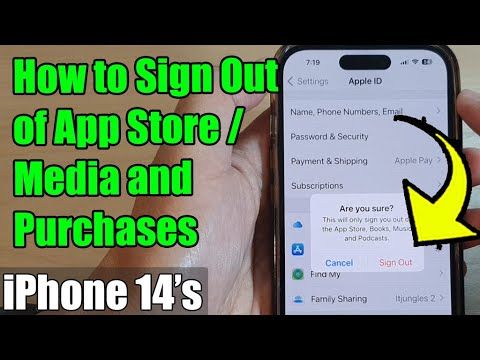
- Select Media & Purchases, then tap Sign Out.
- Restart your device to dump temporary app memory.
- Return to Settings > Media & Purchases and sign back into your Mainland China Apple ID.
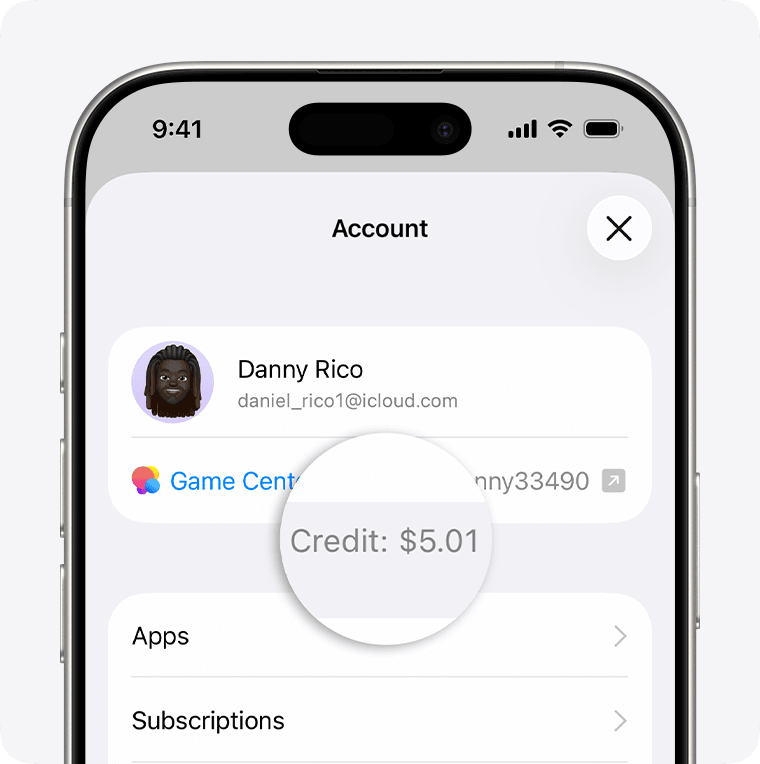
- Launch the App Store, tap your profile icon in the top right, and check the balance under your name.
When an Apple Gift Card is redeemed, funds automatically update on the Apple Account balance and sync to the Apple Account card within the Wallet app on supported iOS devices. If your App Store storefront still shows zero, open the native Apple Wallet app. Check if the Apple Account pass shows your updated CNY balance. If the Wallet app shows the correct funds while the App Store does not, the issue is an isolated storefront cache delay that resolves after re-authenticating.
The Two-Account Trap: iCloud ID vs Media & Purchases
iOS separates device-level iCloud services from your Media & Purchases account. This distinction trips up international gamers managing multiple regional profiles.
An iOS device can use one Apple ID for primary iCloud features and a completely separate Apple ID for Media & Purchases. Gift card funds credit exclusively to the active App Store account. If you redeemed a code while signed into your Chinese profile under Media & Purchases, but check your balance through your primary foreign iCloud profile in device settings, the balance will appear missing.
To prevent syncing personal data to Chinese servers operated by GCBD under Chinese law or locking the device, international users should only log into the App Store app with the China ID. Never sign into device-level iCloud with a secondary regional account.
Verify which account holds the credit: * Open the App Store. * Tap the profile icon on the top right. * Check the exact email listed on that screen.
If the listed email is your primary foreign account, the voucher was either blocked or applied to the wrong profile. Switch to your Chinese Apple ID inside the App Store before re-checking your balance.
Region Locking and Code Redemption Mechanics
Apple Gift Cards are strictly region-locked and tied to regional tax jurisdictions. Attempting to redeem a card on a mismatched regional Apple ID causes immediate transaction rejections. Because each country operates under separate currencies, licensing agreements, and tax jurisdictions, Apple blocks cross-region redemption and does not permit balance transfers.
You cannot redeem a Chinese Yuan gift card on a US, Japanese, European, or UK Apple ID. The App Store will flatly reject the code with a regional mismatch warning.
Unverified online rumors occasionally claim that cross-region vouchers undergo automatic currency conversion within 24 hours. This is false. Official Apple documentation confirms that cross-region redemption is impossible. No automatic currency conversion exists for digital gift cards. A Mainland China iTunes card will only function on an Apple ID whose region is explicitly configured to China.
When stocking up on digital vouchers, make sure you purchase the exact regional variant required for your account. You can pick up a verified iTunes Gift Card (CN) to guarantee your voucher matches the Mainland China storefront without regional rejection.
Typo Traps: Misread Characters and Code Errors
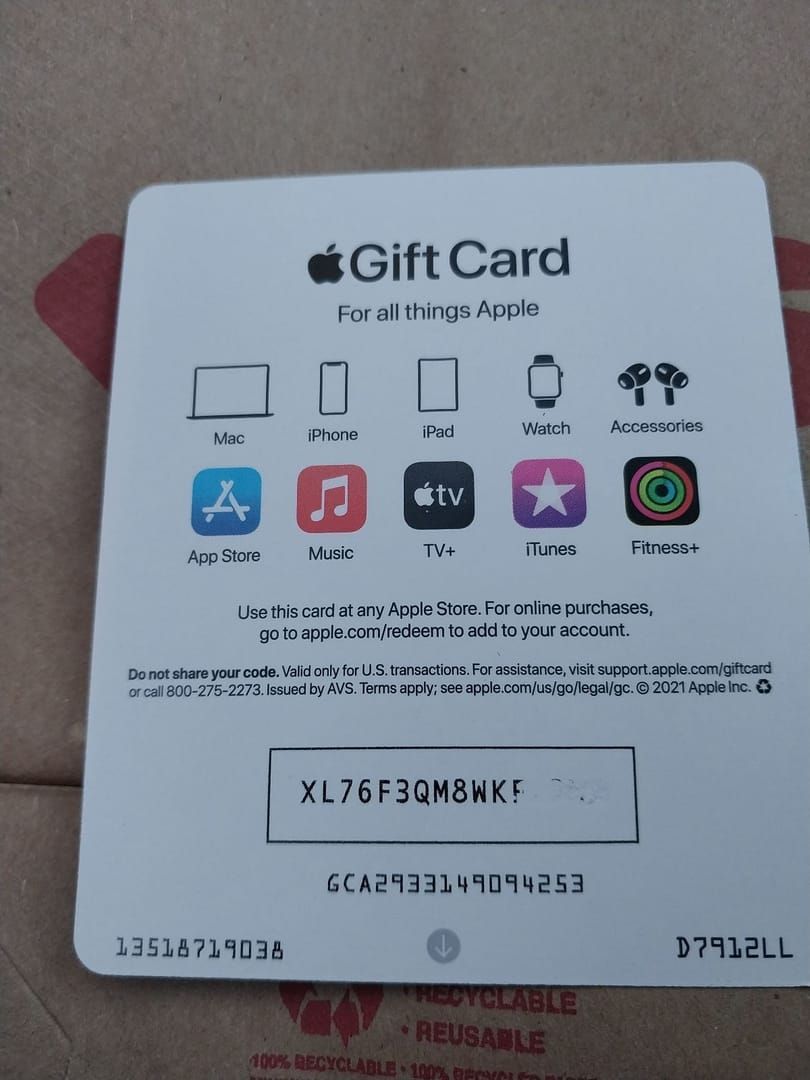
Manual entry mistakes account for a substantial share of apparent card failures. Apple redemption codes are 16-digit alphanumeric strings that always begin with a capital letter X.
Users often confuse the actual redemption voucher with internal serial numbers printed on physical cards or digital receipts. Serial numbers frequently begin with prefixes like GCA, PBH, or EPY. Entering a serial number into the App Store will return an invalid code error every time.
Optical character confusion also causes false redemption rejections. Check your code against these common alphanumeric mix-ups before assuming a voucher is broken:
| Input Character | Commonly Mistyped As | Verification Rule |
|---|---|---|
| 0 (Number Zero) | O (Letter O) | Apple voucher codes rarely use capital O due to zero confusion |
| 1 (Number One) | I (Letter I) | Check font stroke; vertical bars are often the number 1 |
| B (Letter B) | 8 (Number Eight) | Inspect curve loops for flat versus rounded tops |
| D (Letter D) | O (Letter O) | Look closely at the straight left edge of the character |
| E (Letter E) | 3 (Number Three) | Check for straight horizontal prongs versus curved arcs |
| G (Letter G) | 6 (Number Six) | Check if the top loop is open or closed |
| S (Letter S) | 5 (Number Five) | Inspect the top stroke for sharp corners versus smooth curves |
| U (Letter U) | V (Letter V) | Look for a rounded base versus a sharp bottom vertex |
| Z (Letter Z) | 2 (Number Two) | Check for a flat horizontal base line |
Takeaway: If your 16-digit code fails validation, audit every ambiguous digit against the table above and ensure the code begins with 'X'.
Card types matter as well. Physical Apple Store Gift Cards (colored gray, white, silver, or gold) are valid only for hardware at Apple retail stores or on apple.com. They cannot be credited toward digital App Store or iTunes balances. Only digital App Store & iTunes cards denominated in CNY will credit your digital account.
Network Handshakes, VPNs, and Verification Blocks
Many gamers use virtual private networks or proxy tools to route their connection when playing foreign mobile titles. However, running an active VPN while redeeming a gift card on a Mainland China Apple ID frequently causes errors.
Switching networks or running a VPN during the redemption handshake on a Mainland China Apple ID can cause IP mismatches and tax validation errors, triggering timeouts or security blocks. When Apple's security systems detect an IP address flipping rapidly across geographic nodes during a balance addition, the server may pause or drop the session handshake to protect the account.
The result? The database registers the voucher as claimed, but the client app drops the response packet, leaving your on-screen balance at zero and showing an "itunes cn code already redeemed error" if you tap redeem a second time.
To ensure clean redemption handshakes: * Turn off third-party VPNs and proxies on your iOS device. * Connect to a stable local Wi-Fi or mobile data network. * Keep your device clock set to automatic. * Open the App Store and redeem the code directly.
Tracking Your Transaction History and Zeroing Balances
If you cleared your cache, verified your account, and the balance is still missing, check your digital receipt ledger. You can verify credited transactions and purchase deductions by checking your transaction log online at reportaproblem.apple.com or filtering by the last 90 days in device settings.
To view your recent purchase history on iOS: 1. Open Settings > [Your Name] > Media & Purchases. 2. Tap View Account and authenticate. 3. Scroll down and tap Purchase History. 4. Set the date filter to the Last 90 Days.
Look for automated deductions. Some App Store services and recurring subscriptions require a valid payment method on file to renew, even when an active gift card balance is present on the account. However, if an existing subscription or pre-order was pending in an unpaid state, Apple automatically routes freshly redeemed gift card credits toward that outstanding debt the second they land.
Match your intended purchase against standard denomination tiers:
| Voucher Denomination | Value in CNY | Common In-App Purchase Tier |
|---|---|---|
| China iTunes Gift Card ¥50 | ¥50 CNY | Monthly passes, basic battle passes, small gem packs |
| China iTunes Gift Card ¥100 | ¥100 CNY | Mid-tier currency packs, premium gacha rolls |
| China iTunes Gift Card ¥200 | ¥200 CNY | Major event top-up milestones, double-drop bundles |
| China iTunes Gift Card ¥500 | ¥500 CNY | Maximum standard currency tiers, collector bundles |
Takeaway: Selecting the right denomination prevents stranded balance fragments, making it easier to manage regional account balances.
If you plan to switch your Apple ID region back to your home country later, remember that unspent balance blocks changing Apple Account country or region. Users are required to spend all remaining account balance to reach zero and cancel all active subscriptions before a region change is permitted.
To clear an account balance to $0.00 for region changes, users can buy an item exceeding their balance using a linked card or request Apple Support to clear and retain the remaining credit. Avoid redeeming large denomination vouchers if you intend to migrate the account storefront shortly afterward.
When you need reliable top-up funds for your Mainland profile, grabbing a Mainland China App Store code ensures you receive standard denominations that credit directly without currency friction.
Spending Strategy: Pick the Right Denomination
Managing a secondary regional Apple ID requires calculating your exact in-game purchase requirements. Because residual balances lock regional switching, choose your recharge tiers carefully.
F2P / Low-Spender (¥50 Tier)
If you only buy 30-day monthly blessing cards or entry-level battle passes, stick exclusively to ¥50 CNY vouchers. Monthly passes on the China App Store generally hover around ¥30. A single ¥50 card covers your pass with a small cushion. It minimizes stranded credit on an account you might not touch every day.
Mid-Tier Spender (¥100 – ¥200 Tiers)
If you pull on limited character banners or purchase growth funds, ¥100 and ¥200 CNY denominations offer the best balance. Most mid-tier mobile packs sit at ¥68, ¥128, or ¥198. Combining standard denominations lets you hit event spending thresholds cleanly without leaving large unspent sums idling on your account balance.
Heavy Spender / Whale (¥500 Tier)
For players going all-in on major anniversary events or sweeping limited cosmetic bundles, the ¥500 CNY denomination is standard. Top-tier in-game packs on the China storefront commonly cost ¥648 CNY. Stacking a ¥500 voucher with a ¥200 or ¥100 card covers high-tier bundles in a single session.
Safe Top-Up Verification: Legitimate Codes vs Account Traps
Protecting your secondary Apple ID requires knowing the difference between safe digital voucher delivery and dangerous account manipulation.
Legitimate digital retailers provide an unredeemed 16-digit voucher code beginning with 'X'. You enter this code directly into your own App Store client while logged into your personal China Apple ID. A legitimate seller will never ask for your Apple ID email, your account password, or your two-factor authentication codes.
Scam services and fraudulent sellers often request direct account access, claiming they will "load" the balance for you. Handing over login credentials risks device locks, account theft, and personal data exposure. If a seller asks for your password or demands remote access to complete a top-up, walk away immediately.
When legitimate gift card redemptions fail to reflect in account balances after cache clearing, opening a support case with original proof of purchase leads to resolution in approximately 95% of cases within 48 hours. However, aggregate consumer dispute surveys across broader Apple customer service interactions report lower overall single-contact resolution rates around 20%.
To ensure your case falls into that successful 95% resolution bracket: * Save the original digital invoice showing the transaction timestamp. * Locate the physical or digital serial number (starting with GCA, PBH, or EPY). * Take a full-screen screenshot of your 90-day purchase history showing no duplicate credit. * Provide Apple Support with the exact 16-digit pin.
Whenever you top up, sourcing a genuine China iTunes voucher keeps your account secure and eliminates the risks tied to unauthorized credential sharing.
Frequently Asked Questions
Why is my China iTunes gift card balance showing as zero after redemption?
Your App Store cache may be displaying outdated data, or the card was credited to a different Apple ID than your iCloud profile. Sign out of Media & Purchases and sign back in to refresh the displayed balance.
Can I redeem a Mainland China iTunes card on a US or foreign Apple ID?
No, Apple Gift Cards are strictly region-locked to the country of purchase. You must redeem the code on an Apple ID registered to Mainland China.
How can I check which Apple ID received my redeemed gift card balance?
Go to Settings > [Your Name] > Media & Purchases > View Account to see the active email. The funds will only display beneath the specific account used during redemption in the App Store.
Why does the App Store say my gift card code has already been redeemed?
This error occurs if you tapped the redeem button twice or if the code was previously claimed on another account. Check your purchase history and refresh your account balance to confirm if the funds landed.
Should I use a VPN when redeeming a China Apple Gift Card?
No, using a VPN can trigger security handshakes and tax mismatch errors due to IP changes. Keep your connection stable on your local network while signed into your China Apple ID.
Is it safe to sign into iCloud with a Chinese Apple ID to see my balance?
You should only sign into the App Store app with your Chinese Apple ID, not device-level iCloud. This avoids syncing your personal photos, contacts, and Find My data to regional servers.
What should I do if my balance still does not show after restarting the App Store?
Check your Purchase History to verify if the redemption processed or if pending charges absorbed the credit. If no record appears, contact Apple Support with the card serial number and purchase receipt.
Diagnostic Summary: Getting Your CNY Balance Running
Seeing a zero balance after entering a valid China iTunes voucher is almost never a catastrophic loss. In nine out of ten cases, the credit has safely landed in Apple's backend database, while your local iOS App Store client is simply serving you stale cached data.
Run through the core checklist in order: sign out of Media & Purchases, restart your device, log back into the App Store, and confirm you are viewing the correct regional profile. Double-check your 90-day purchase history at reportaproblem.apple.com to ensure a background subscription renewal did not claim the funds on arrival.
If the code itself threw an error, check the 16-digit string for common optical character mix-ups like 0 vs O or B vs 8, ensure the string starts with 'X', and verify your connection is running clean without a VPN. By methodically isolating client cache issues from credential and region mismatches, you can clear balance stalls quickly and get back to your games.